

Low conversion rates frustrate even experienced advertisers. You’ve done the hard work — launched ads, generated traffic, earned clicks — but sales don’t follow. If your Meta ads aren’t converting, the problem likely lies beyond the ad itself.
This article outlines specific, often overlooked reasons for low conversion rates and how to fix them. These insights apply especially to advertisers running campaigns on Facebook and Instagram.
Understand what a "conversion rate" really shows
A conversion rate isn’t just a number — it’s a signal of misalignment between your ad targeting and the actual post-click experience. If people click and don’t buy, the issue often lives in the funnel.
Fixing that mismatch starts with knowing where and why people are dropping off.
Step 1: Identify drop-off points in your funnel
Don’t treat the conversion rate as a single metric. Break it down by funnel stage:
1. Visitors bounce from your landing page
This usually means a disconnect between the ad and what they see next. For example:
-
Mismatch in message — An ad promises "50% off" but the page buries the offer.
-
Poor mobile experience — A cosmetics brand ran beauty ads that opened to non-responsive pages, causing a 75% bounce rate.
-
Slow load time — Even a 2-second delay can cause a 9% increase in abandonment.
More troubleshooting ideas: Why your mobile landing page is killing conversions (and how to fix it).
2. Add-to-cart rates are low
If users browse but don’t add anything to the cart:
-
Unclear pricing — Hidden shipping fees or taxes at checkout turn people away.
-
Lack of trust — No reviews or security badges reduce confidence in purchasing.
-
Weak product descriptions — Generic language leads to decision paralysis.
E.g., an online apparel store saw a 30% lift in conversions by adding “ships free in 2 days” next to the CTA.
3. Users drop off during checkout
They wanted to buy — but something blocked them:
-
Too many steps — Avoid forcing account creation unless necessary.
-
No mobile wallet options — If 60% of traffic is mobile but only credit cards are accepted, you’re losing sales.
-
Bad UX — A beauty brand removed one form field and recovered 20% of abandoned carts.
Step 2: Align your traffic with funnel readiness
Not every click is equal. A common mistake is using cold traffic for campaigns designed for buyers.
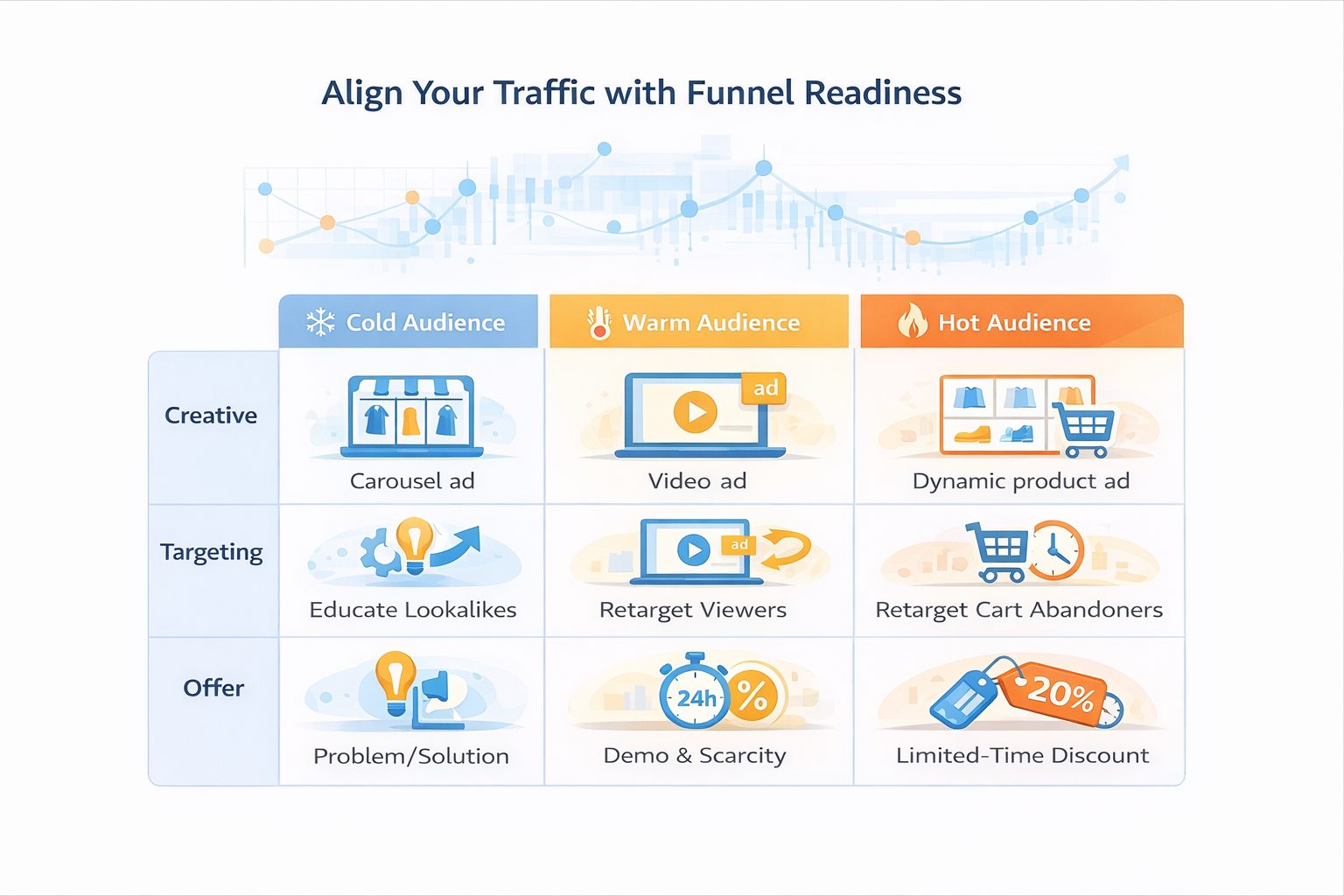
Here’s how to fix that:
Use high-intent audiences
Generic interest targeting is overused. Instead, use behavioral signals to guide who sees what:
-
Retarget people who visited a specific product page, not just your homepage.
-
Create separate campaigns for cart abandoners, using urgency-based creative.
See how: How to retarget add-to-cart users with Facebook ads.
Segment by user intent
Examples of aligned targeting:
-
First-time visitors → Show educational video ads or testimonials.
-
Repeat browsers → Use countdowns or scarcity ("Only 5 left").
-
Cart abandoners → Offer time-limited discounts or payment plan reminders.
A pet accessories brand increased ROAS 2.1x by separating new and returning visitors into two campaigns with tailored messaging.
Step 3: Match ad creative to awareness level
Conversion problems often stem from creative mismatches — great offers shown to the wrong people.
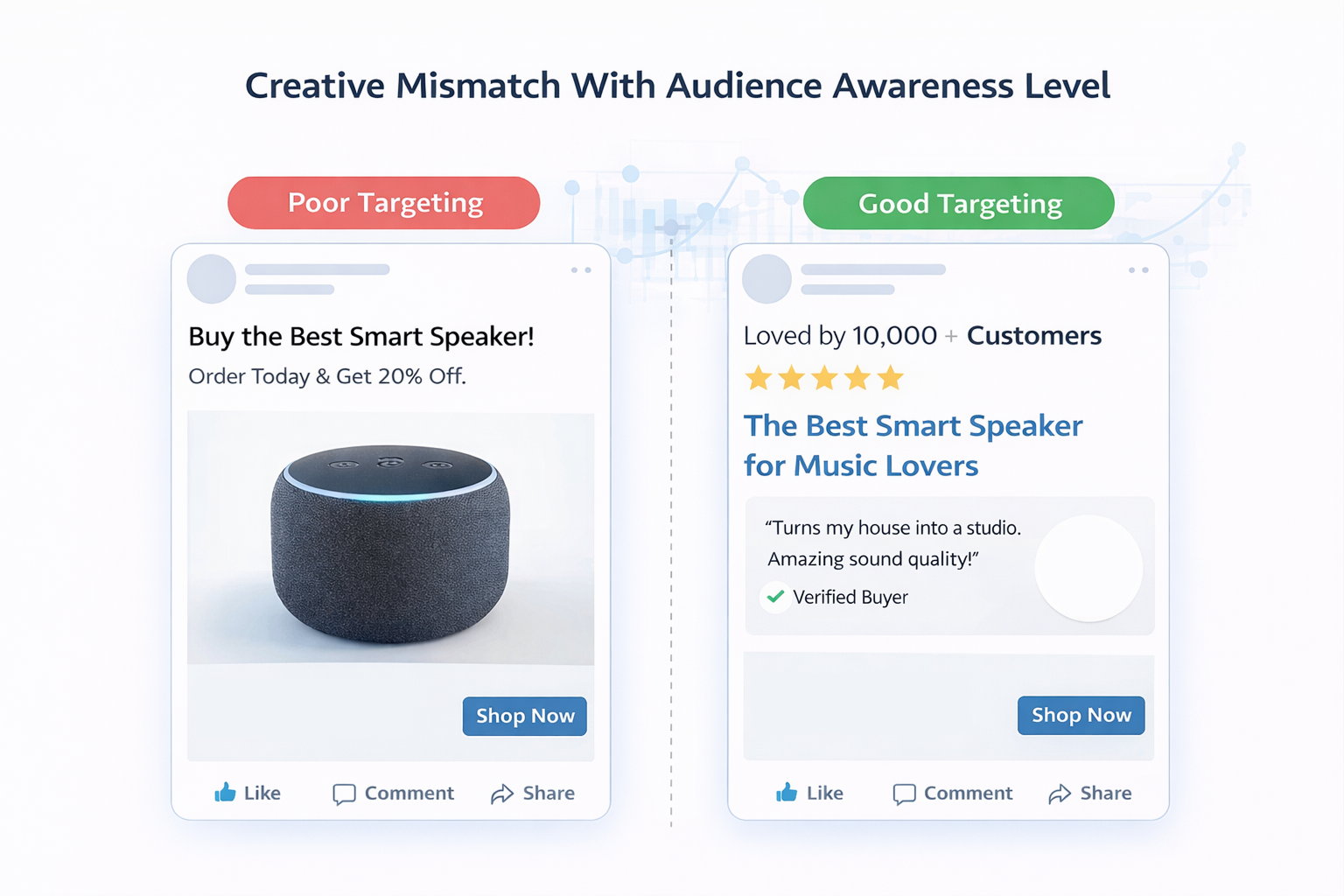
Map creative to buyer stage
-
Cold audiences — Use ads that demonstrate the product in action, with clear problem-solution framing.
-
Warm audiences — Use side-by-side comparisons, influencer content, or limited-time bundles.
-
Hot audiences — Retarget with social proof, urgency, and testimonials.
An electronics retailer used this model and doubled ROAS by giving each segment its own ad set and creative concept. Their warm audience ad included a 15-second comparison video between their product and a well-known brand — with clear visual proof.
Need inspiration? Try: Facebook ad formats that work best for SaaS free trials — many of these principles apply to e-commerce too.
Step 4: Clarify and test your offer
Many brands blame targeting when the real problem is offer clarity.
Strong offers include:
-
Anchored value — “Usually $99. Now $59” is clearer than “30% off”.
-
Risk removal — Free returns, guarantees, or “Try it free for 7 days.”
-
High relevance — Frame your product around real problems, not features.
For example, “Get back pain relief in 15 minutes” outperforms “Ergonomic seat cushion with memory foam.” It speaks to the outcome.
A supplement brand saw conversions rise 3x when they stopped promoting ingredients and started focusing on user-reported benefits like “better sleep in 7 days.”
Step 5: Don’t scale too early — validate first
Marketers often scale ads based on click data. But clicks without conversions just burn money.
Before scaling:
-
Confirm at least 1 sale per 100 clicks from cold audiences;
-
Let campaigns run for 3–5 days before making decisions;
-
Track 7-day click / 1-day view attribution instead of 1-day only;
-
Avoid relying only on Meta data — use your e-commerce platform and post-purchase behavior too.
Extra tip: Understanding the conversion window in Facebook ads can help you set realistic attribution expectations.
Recap: make your funnel conversion-friendly
To fix low conversion rates:
-
Diagnose where in the funnel people drop off;
-
Align audience intent with funnel stage;
-
Show the right creative to the right segment;
-
Clarify and strengthen the offer;
-
Validate results before scaling up.
Traffic is only as valuable as the journey it connects to. Fixing the post-click experience — not just the ads — is where real growth begins.
